

A personalised news feed is a curated stream of articles, updates, and commentary filtered to match your specific interests, whether that is climate policy, international affairs, or domestic political debate. The industry term for this practice is news feed personalisation, and the tools that power it range from simple RSS readers to multi-stage aggregation pipelines. Platforms like Inoreader, YourRSS, and Glean make it possible to build personalized news feed systems without writing a single line of code. The payoff is significant: instead of wading through dozens of irrelevant headlines each morning, you receive a digest shaped entirely around what you actually want to read. For anyone following current events and social issues, that focus is not a luxury. It is a necessity.
What tools and sources can you use to build a personalised news feed?
The foundation of any custom news aggregator is its source layer. RSS and Atom feeds remain the most reliable input format because they are structured, machine-readable, and available from virtually every major news outlet, from The Guardian to Al Jazeera to niche policy blogs. Subscribing is straightforward: find the RSS link on a publication’s website, paste it into your chosen aggregator, and the tool handles the rest.
Beyond RSS, you can pull content from public APIs, social media channels, and web scrapers. Reddit’s public API, for instance, surfaces community-curated discussions on specific topics. Telegram channels have become a significant source for political commentary in several regions. The Horizon project collects from Hacker News, Reddit, RSS, and Telegram, scores articles on technical depth and novelty, and publishes daily briefings. That multi-source approach is worth replicating because no single platform captures the full picture of any given story.

Here is a comparison of the most practical tools for building a tailored news feed in 2026:
| Tool | Best for | Key feature | Technical level |
|---|---|---|---|
| Inoreader | General RSS curation | Rules-based filtering, folder organisation | Beginner |
| YourRSS | Preference-driven feeds | Like/dislike commands via Cortex Memory | Intermediate |
| Glean | Pipeline-based aggregation | YAML-defined stages: dedup, rank, summarise | Intermediate |
| Horizon | Multi-source daily briefings | AI scoring with personal interest boosts | Intermediate |
| Distiller | Summarisation quality | Retrieval-augmented, schema-validated summaries | Advanced |
Each tool occupies a distinct niche. Inoreader suits readers who want a clean interface with minimal setup. Glean and Horizon suit those who want a more automated, configurable pipeline. The right choice depends on how much control you want over the ranking and filtering logic.
Pro Tip: Start with Inoreader for your first month. Once you know which sources you actually read, migrate to a pipeline tool like Glean to automate the filtering you are already doing manually.
How to set up and configure a personalised feed pipeline
Setting up a custom content feed that genuinely serves you requires more than subscribing to a handful of RSS sources. The process has five distinct stages, and skipping any one of them produces a feed that quickly becomes noise.
-
Select your sources deliberately. Begin with ten to fifteen sources across at least three perspectives on your core topics. If you follow UK domestic politics, that might mean The Times, The Guardian, Politics Home, and two or three specialist policy newsletters. Breadth at the source level prevents the feed from becoming an echo chamber before you have even applied a filter.
-
Apply deduplication. The same story will appear across multiple outlets within hours of breaking. Canonical URL hashing is the preferred method for identifying duplicates because it reliably catches the same article republished across platforms and dates, unlike title-matching which fails when headlines are reworded. Glean and Horizon both implement this automatically.
-
Rank articles by relevance. Ranking is where personalisation becomes meaningful. Modern systems use a two-stage pipeline that first narrows thousands of candidates using lightweight embedding similarity, then applies a detailed ranker that weighs topic match, source authority, and recency. For most readers, a simpler keyword-based scoring system works well as a starting point.
-
Summarise for efficient reading. Long-form articles are valuable, but reading twenty of them each morning is not realistic. The Distiller project demonstrates how retrieval-augmented summarisation produces exactly three grounded bullet points per article, validated against a JSON schema to prevent inaccurate or malformed output. That structure makes scanning fast without sacrificing accuracy.
-
Choose your delivery method. Glean supports output to dashboards, email, or chat apps on a defined schedule. Email digests work well for morning reading routines. Dashboard delivery suits readers who check news throughout the day. Chat app integration, via Slack or Telegram, works for teams monitoring specific topics in real time.
The entire pipeline benefits from being modular. Separating deduplication, ranking, and summarisation into distinct stages with clear inputs and outputs means you can swap out one component without rebuilding the whole system. That flexibility is what makes pipeline tools like Glean worth the initial setup effort.
What methods improve relevance and avoid bias in your feed?
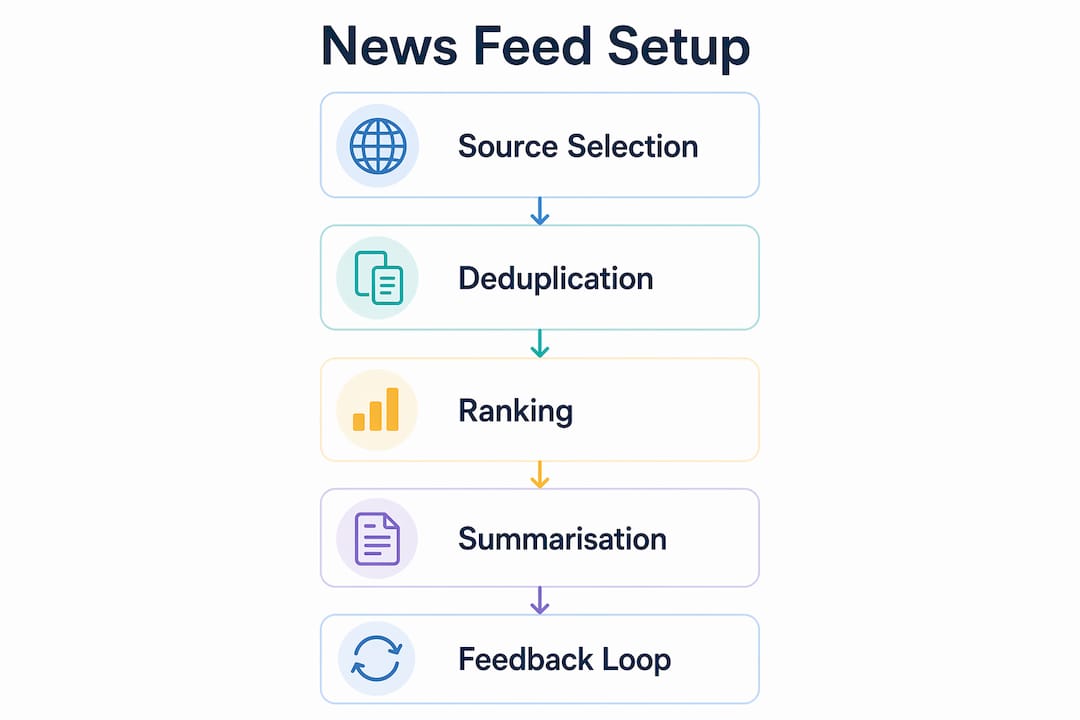
Building a feed that stays relevant over time requires active feedback mechanisms, not just a one-time configuration. The most common mistake is setting up a feed and never adjusting it, which means the system never learns what you actually value.
Explicit feedback is the most direct signal you can give. YourRSS uses like and dislike commands that store your preferences via Cortex Memory, feeding those signals into the scoring of subsequent article digests. This approach works effectively without requiring complex machine learning infrastructure. The signal is clean because it reflects deliberate intent rather than passive behaviour like scroll depth or dwell time.
Passive signals, however, carry a hidden problem. Click data is distorted by position and exposure bias: articles at the top of a feed receive more clicks simply because they appear first, not because they are more relevant. Amazon’s research on debiasing uses propensity scoring to correct for this, ensuring that recommendation signals reflect genuine user preference rather than feed position. For individual users, the practical equivalent is periodically reviewing which sources you actually read versus which ones you scroll past.
“Offline evaluation filters candidate strategies, but only online A/B tests with careful guardrails truly determine personalisation effectiveness.” This principle, drawn from recommendation systems research, applies even at the individual level: the only way to know if a filter change improved your feed is to measure your reading behaviour before and after.
Avoiding filter bubbles requires deliberate effort. A feed tuned entirely to your existing preferences will gradually exclude perspectives you have not yet encountered. The solution is to include at least two or three sources that challenge your default framing on major topics. Understanding why opinion pieces go viral helps explain why algorithmically curated feeds tend to amplify emotionally charged content. Counteract this by weighting source diversity explicitly in your ranking configuration.
How to troubleshoot common problems and optimise your feed
Even a well-configured feed develops problems over time. Recognising the symptoms early saves hours of frustration.
Repetitive content is the most common complaint. If the same story appears three or four times in a single digest, your deduplication stage is either misconfigured or absent. Check that canonical URL hashing is active. If you are using a tool without built-in deduplication, add a URL normalisation step before content enters the ranking stage.
Poor or inaccurate summaries undermine trust in the entire feed. Structured constraints on summarisation output, such as requiring an exact number of bullet points and validating the output against a JSON schema, reduce hallucination and rendering errors significantly. If your summaries feel vague or occasionally wrong, the fix is almost always adding output validation rather than changing the underlying model.
Overwhelming volume usually means your source list has grown without a corresponding tightening of filters. A practical maintenance routine helps here:
- Review your source list monthly and remove any outlet you have not read in four weeks.
- Adjust keyword filters quarterly to reflect shifts in your interests.
- Check your top-ranked articles weekly to confirm the scoring logic still matches what you find valuable.
- Use two-phase scoring, applying fast lightweight scoring across all articles and generating detailed summaries only for the top items, to reduce processing time and keep delivery fast.
Pro Tip: Set a calendar reminder for the first Sunday of each month to audit your feed sources. Fifteen minutes of maintenance prevents months of irrelevant content accumulating.
Understanding why clickbait dominates news is also useful context here. Many RSS sources include promotional or low-quality articles alongside substantive reporting. A simple domain-level blocklist, excluding known clickbait publishers from your source pool entirely, is more effective than trying to filter individual articles after the fact.
Key takeaways
Building a reliable personalised news feed requires a modular pipeline covering source selection, deduplication, relevance ranking, validated summarisation, and regular maintenance to stay accurate and bias-aware.
| Point | Details |
|---|---|
| Start with source diversity | Subscribe to at least ten sources across multiple perspectives before applying any filters. |
| Deduplicate by URL hash | Canonical URL hashing catches cross-source duplicates more reliably than title matching. |
| Use explicit feedback signals | Like and dislike commands provide cleaner preference data than passive click behaviour. |
| Validate summarisation output | Schema validation prevents inaccurate or malformed summaries from eroding feed trust. |
| Maintain the feed monthly | Remove unread sources and adjust keyword filters to prevent volume and relevance drift. |
Why I stopped trusting algorithmic feeds and built my own
I spent two years relying on platform-curated feeds before I accepted that they were not working for me. The problem was not the volume. It was the invisible hand shaping what I saw. Stories on housing policy would appear for three days and then vanish, replaced by whatever was generating the most engagement that week. I had no visibility into why, and no way to correct it.
When I started building my own pipeline using tools like Glean and YourRSS, the first thing I noticed was how many sources I thought I was reading that I was actually ignoring. The feedback loop exposed my real preferences rather than my aspirational ones. That was uncomfortable but useful. I cut my source list from forty outlets to eighteen and immediately found the feed more readable.
The hardest part was not the technical setup. It was resisting the urge to over-engineer the ranking logic before I had enough feedback data to make it meaningful. My advice, drawn from that experience, is to run a simple keyword-based filter for the first month and only introduce weighted scoring once you have a clear sense of what you actually want to read more of. Patience in the early stages produces a far better feed than rushing to implement a complex model on day one.
I also found that including sources I disagreed with, deliberately and in small doses, made the feed more useful for writing and analysis. A feed that only confirms what you already think is not a news feed. It is a comfort blanket. The Whitebunnywabbit news section reflects that philosophy: covering current events from multiple angles rather than a single editorial line.
— John
Deepen your news curation skills with Whitebunnywabbit
If this article has prompted you to think more carefully about how you consume news, Whitebunnywabbit has resources to take that thinking further.
The education resources at Whitebunnywabbit cover digital literacy, media analysis, and the mechanics of news production. Whether you are refining a feed you have already built or starting from scratch, understanding the media environment you are curating from makes every filtering decision sharper. For anyone serious about staying informed on current events and social issues without being overwhelmed, that foundation in media literacy is what separates a good feed from a great one. Explore the resources and build the reading habit your interests deserve.
FAQ
What is a personalised news feed?
A personalised news feed is a curated stream of articles filtered by your chosen topics, sources, and preferences, delivered via RSS readers, email digests, or dashboards. It replaces generic homepage feeds with content matched to your specific interests.
Which tool is best for beginners wanting to create a tailored news feed?
Inoreader is the most accessible starting point because it supports RSS subscriptions, folder organisation, and rules-based filtering without requiring any technical configuration. More advanced users can progress to Glean or YourRSS for pipeline-based personalisation.
How do I stop my personalised feed from becoming an echo chamber?
Include at least two or three sources that represent perspectives outside your default framing, and weight source diversity explicitly in your ranking settings. Reviewing how to engage editorial debate online offers practical strategies for maintaining intellectual breadth.
How does deduplication work in a news feed pipeline?
Deduplication uses canonical URL hashing to identify and remove stories that appear across multiple sources or on multiple days. This method is more reliable than title-matching because headlines are frequently reworded between publications.
How often should I update my news feed configuration?
A monthly source audit and a quarterly filter review are sufficient for most readers. Remove any source you have not read in four weeks and adjust keyword filters to reflect any shift in your interests or the news cycle.
Leave a Reply